/Docs · Every day
Get ready for a meeting
Louvain prepares a brief for each meeting from your sources, so you know what's open, what's changed and what to decide before you go in.
This page is for anyone with a meeting coming up who wants to walk in knowing what's open and what to decide.
In short: a meeting's Before tab is its brief: what was said or promised last time, what's been done since, what's new and what to decide. Every line links to the source it came from, and it was checked sentence by sentence.


Briefs prepared for you#
Louvain prepares a brief for each meeting in the rest of your day, from 04:30 in your time zone, so most meetings already show View brief when you look. It does this for anyone who has used Louvain in the workspace in the last 14 days, whether on the web, in the Mac app or through a connected assistant. A meeting that reaches your calendar later in the day, even a few minutes before it starts, is briefed as soon as Louvain reads it: you don't need to press anything. The same happens when a meeting's time or who is invited changes. While it's being written, the meeting says Preparing….
A meeting due to start within an hour and a half is prepared first, on the faster model tier, because there would be no time to try again. A meeting that has already started is not briefed for you, though you can still press Prepare brief. These briefs count toward your workspace's daily allowance of briefs prepared ahead and stop when your plan or processing budget does not allow them; then the meeting offers Prepare brief as usual.
Prepare a brief#
- Choose an upcoming meeting on your own calendar.
- Select Prepare brief. The same button is on Today, under Next up.
- While it's being prepared, the tab says "Preparing this brief… it opens here when it’s ready." On Today it says "Preparing your brief…", then View brief.
Writing a brief can take up to about three minutes, and the button says Preparing… until it's done. Louvain says a brief couldn't be prepared only when it couldn't. If your connection drops while it's being written, Louvain checks the brief instead and shows it when it's ready. If your request never reached Louvain, it says so, and you can try again.
If a brief could not be written, the tab says why and offers Prepare again.
What's in a brief#
Louvain prepares it the way an assistant would. It looks at what was said or promised last time with these people, then checks your Plate and the later messages, emails and documents to see whether each has been done. Something a later source shows done is said as done, with that source's link.
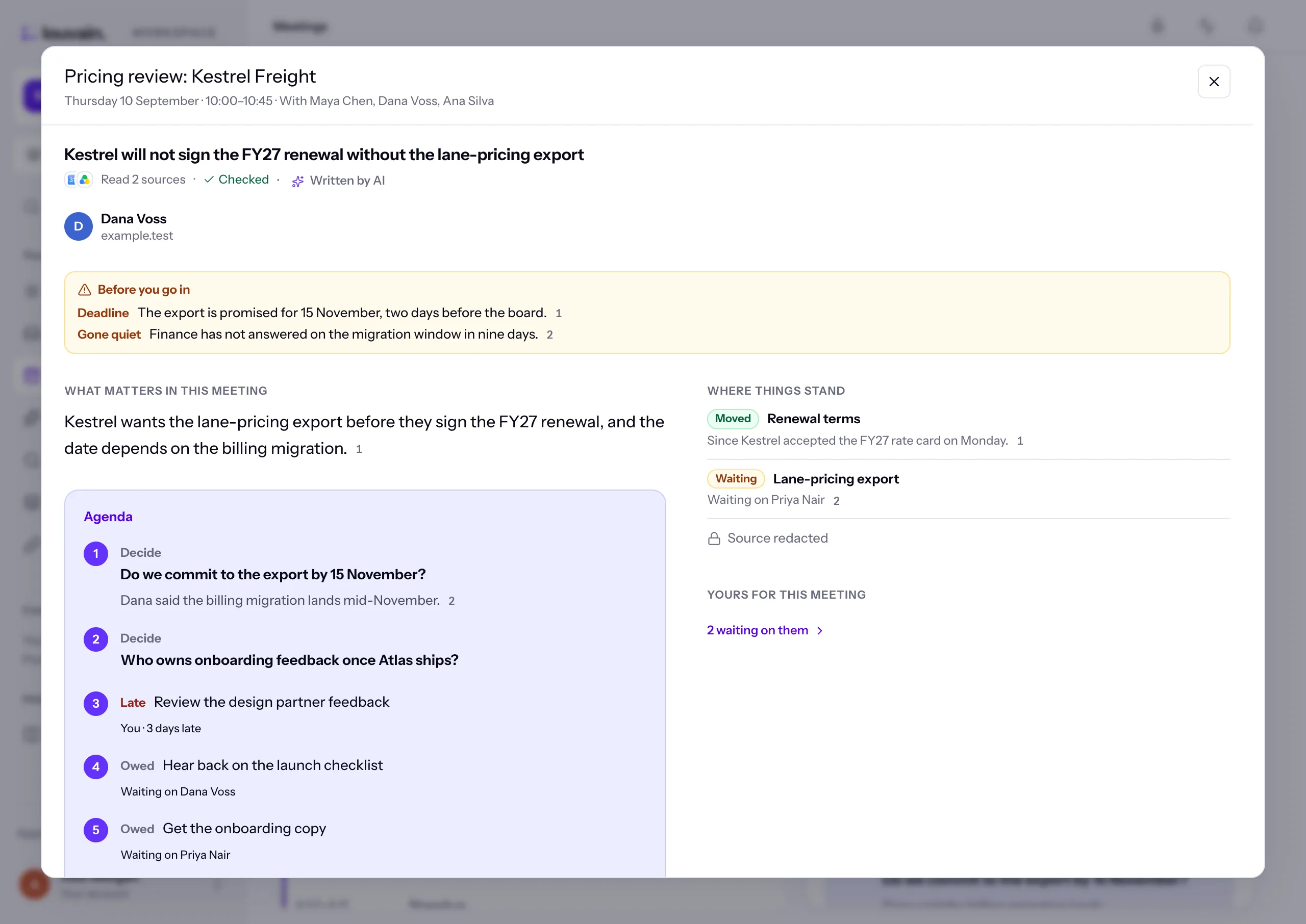
At the top is how many sources it read, for example Read 122 sources · Checked · Written by AI. Then, in order:
- Before you go in — only when there's something to watch for: two sources that disagree, a deadline or a thread gone quiet.
- What matters in this meeting — one or two points, each with its numbered links.
- Agenda — up to five items in the order to take them: open questions first, then what's open on your Plate with these people, late first. Each says Decide, Late or Owed, whose it is and when it's due. Copy agenda copies it as plain text.
- Read first — the three sources the summary leans on most.
- Where things stand — each thread labelled Moved, Stuck, Waiting, New or Done, with one line on where it is.
- Yours for this meeting — your plate items due by the meeting, or from a source Louvain read to prepare it. The rest are counted ("2 more on you"), and the count opens your Plate.
- More — what they've said lately, in their own words, and the background.
When you expand the meeting, Who's in it shows each person with their face, name and where their address is from.
Briefs prepared before this layout still show their older one, with Open between you and Take into the room.
Tell it what the meeting is about#
- Open the meeting's ⋯ and choose What’s this meeting about?
- The invitation's own text is shown first. Louvain always reads it.
- Add a note of your own: what you want out of the meeting, what to lead with.
- Use Pin a source to pin up to five sources it should start from: an email, a message, a file, anything you can open.
- Save, then select Rewrite brief now. Otherwise the next brief uses your note and pins.
Only you see your note and pins. Your note decides what Louvain looks for and leads with, but it is never treated as a source: a figure or name you type there is not repeated unless a source says it.
Keep it up to date#
When the meeting changes before it starts (its title, time or who is invited), or a source it was prepared from changes, the tab offers Update available. Someone accepting or declining the invitation does not.
To have it written again at any time until the meeting ends, open the meeting's ⋯ and choose Rewrite brief. What you had stays on the page until the new one is ready. Rewrites share an hourly limit with Prepare brief.
What's changed since the brief#
Before a meeting, What’s changed since this brief? is the button at the top of its panel. One press checks what has moved since the brief was prepared:
- the sources it used that changed;
- newer messages with the people in it;
- newer sources about its subject, even when they name nobody in it.
You get up to five lines, each checked against your sources with numbered links, plus items on your plate with these people that were opened or done since. When nothing has moved, it says "Nothing new since" the time it was prepared.
Good to know#
- Select a numbered link to see the source behind it, at that spot. ✕ or Escape brings you back.
- When the brief says someone said or did something, that person must have words of their own in the source, or the source must name them for it. Open the numbered link when who said it matters.
- When a source is no longer available to you, its place says Source redacted.
- Select Ask about this to ask a follow-up question about the meeting.
- A past meeting with no brief says "No brief was prepared for this meeting."