Asking questions
Ask in ordinary words, see the source behind every sentence, and ask as of an earlier date.
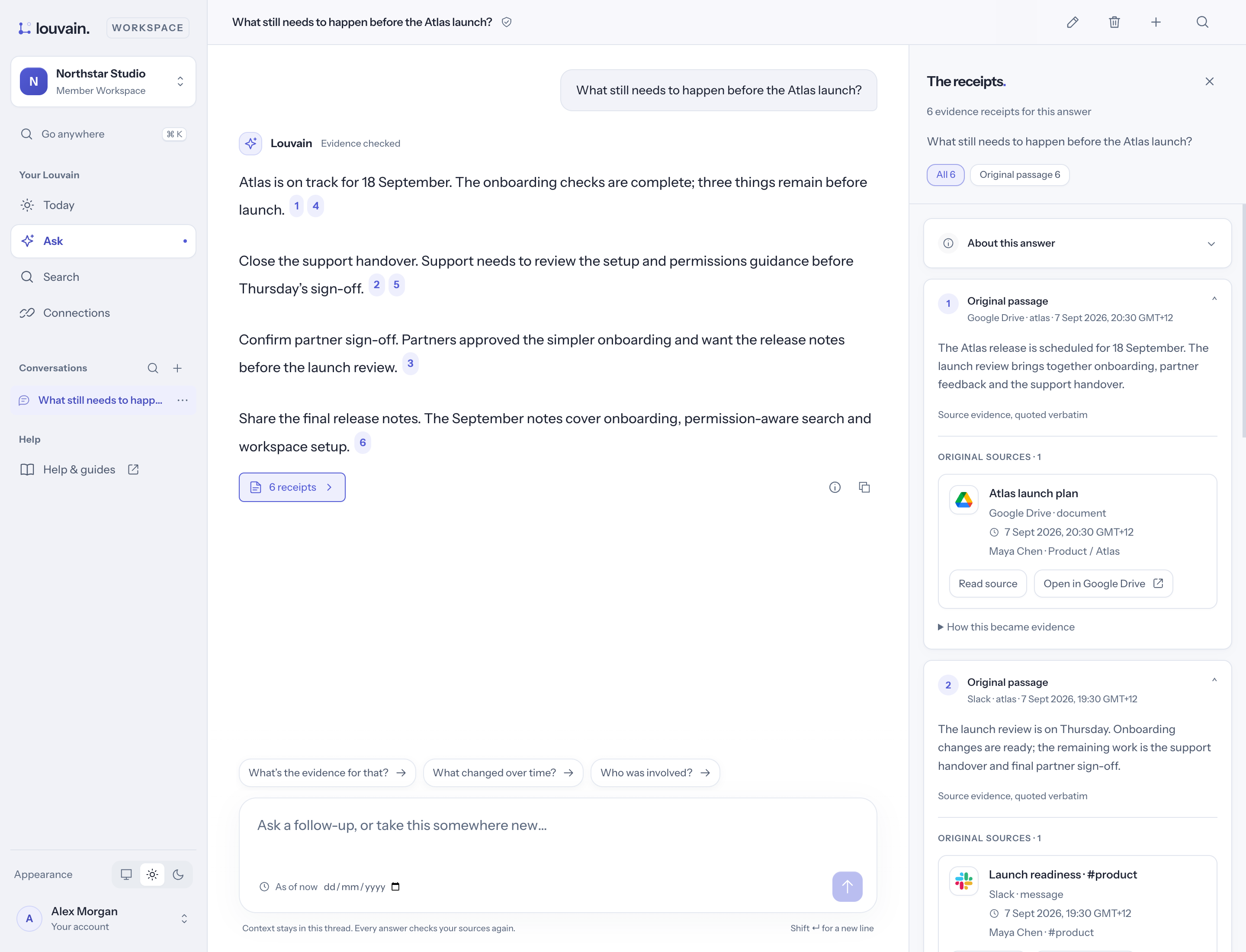
Ask a question
- Open Ask in the sidebar.
- Type your question in the box ("Ask anything, @ to add a file…"), or tap a suggestion.
- Press Enter.
The answer arrives with a small label:
- Checked against sources — every figure, date and name in it was checked against the sources it cites. A sentence that couldn't be checked is left out.
- Assembled from your sources — built straight from what your sources record.
- Couldn't confirm — nothing you can see answers it. Louvain says so rather than guess, and shows what it did find.
See where each sentence came from
Each sentence ends with a number. Select it to open The receipts: the message, document or meeting it came from, with the words that support it marked. About this answer shows how it was put together.
Ask about something specific
- Type @ to pick a file, a person or a topic to start from.
- Choose + and Add sources or Add from a collection to ask about particular files.
Ask as of an earlier date
Choose + then As of… and pick a date. The answer is what your sources said by that day, with anything later set aside. The date stays on the question as an As of chip.
Follow up
Under an answer, tap a suggestion such as "What's the evidence for that?" or "What changed over time?", or type your own in the box ("Ask a follow-up…").