Today
Your day in context — what changed, what needs you and what's coming up.
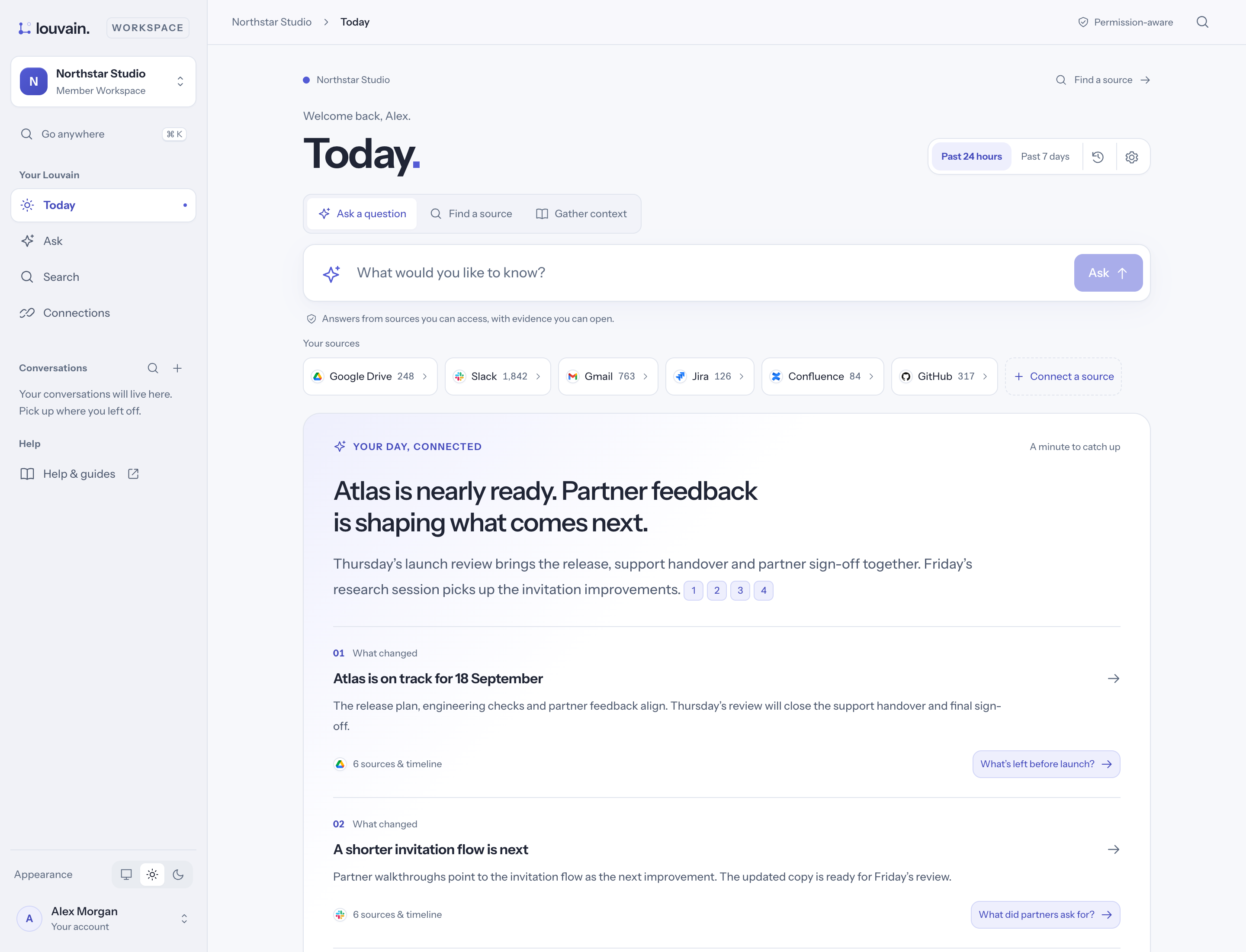
Today is where Louvain opens. It brings together what changed across your sources, what is on your plate, and the meetings coming up.
What you'll see
- The summary — a short summary labelled "Written by AI from your sources", with what's in it, what's worth checking, what changed and what's coming up. Every point links to its sources.
- Your plate — the items that need you most, with See all to open Plate.
- Next up — your coming meetings, each with Prepare brief. See Preparing for meetings.
- Browse stories — related updates grouped into stories. Each has View evidence, Read the story and Ask about this.
Change the time window
Choose Past 24 hours or Past 7 days at the top. The refresh button asks for a fresh summary; the current one stays on the page until the new one is ready.
Today is ready when you open it
Louvain prepares your Today in the background: about every hour while you use it, and again when new things arrive for you. Opening it shows what was prepared, straight away. The first time you open it, or just after your access to a source changes, it says it is getting ready and fills in within a minute or so.
Tune what matters to you
- Select the settings icon at the top (Tune Today).
- Under What matters to you, write your priorities in your own words.
- Add any other email addresses you use, one per line, so Louvain knows they are yours.
- Choose Save and re-rank.
You can also mark a story More like this or Less like this, Snooze for 24 hours, or Hide from your brief.